A modern platform for managing cash flow, tax, property and investments in Australia - designed to make your finances feel simple, clear and in control.
Every moving part of your financial life, modeled in one place.
MoneyMoves turns disconnected accounts, goals, tax, property, investments and cash-flow signals into one clear next action — built for Australian rules, currency and context.
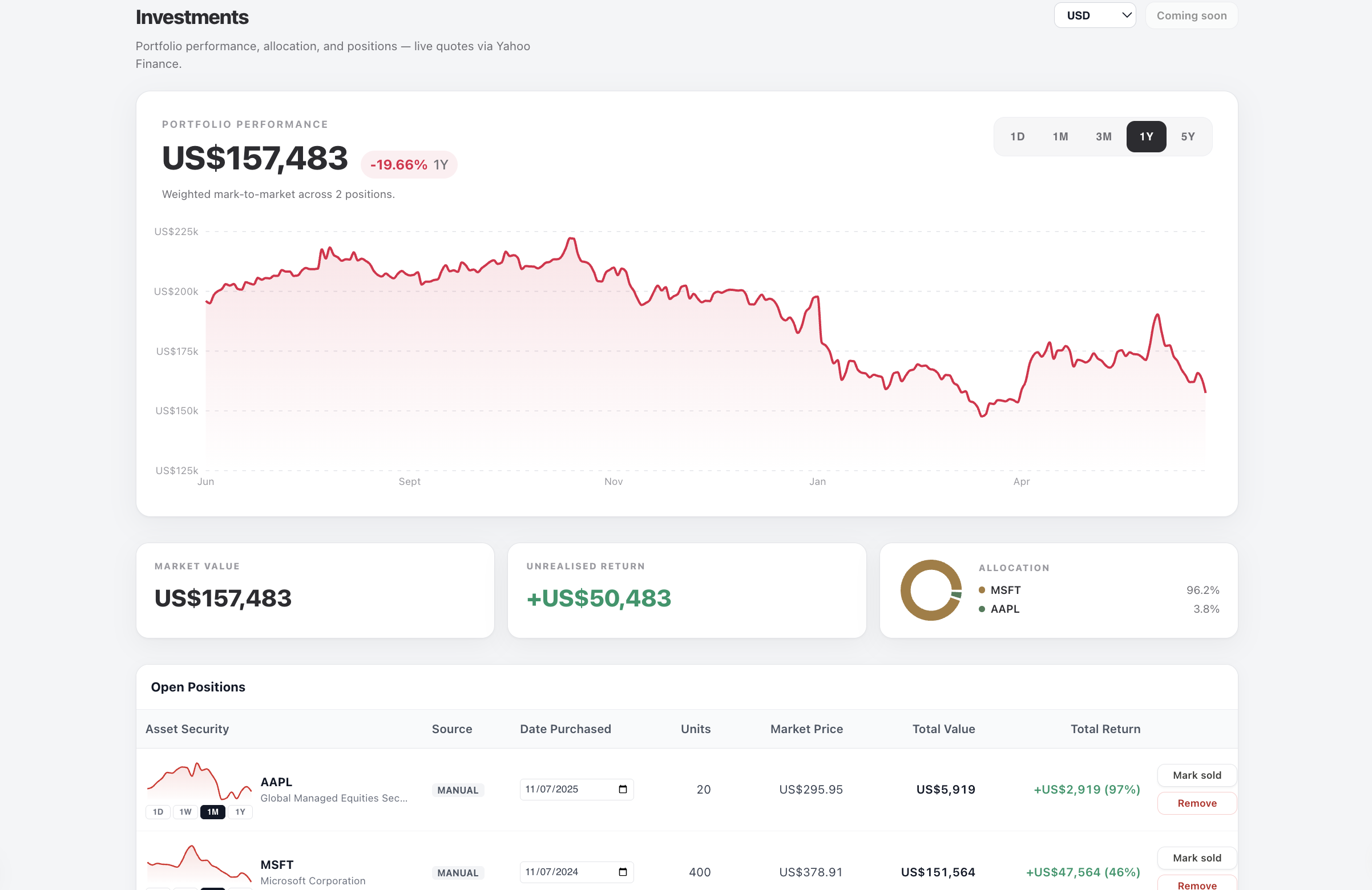
Tracking investments
Track holdings, live performance and CGT across AUD and USD — synced from brokerage or entered by you.
Aussie tax & HECS
Estimate take-home pay, HELP repayments and capital gains without stitching spreadsheets together.
Super monitoring
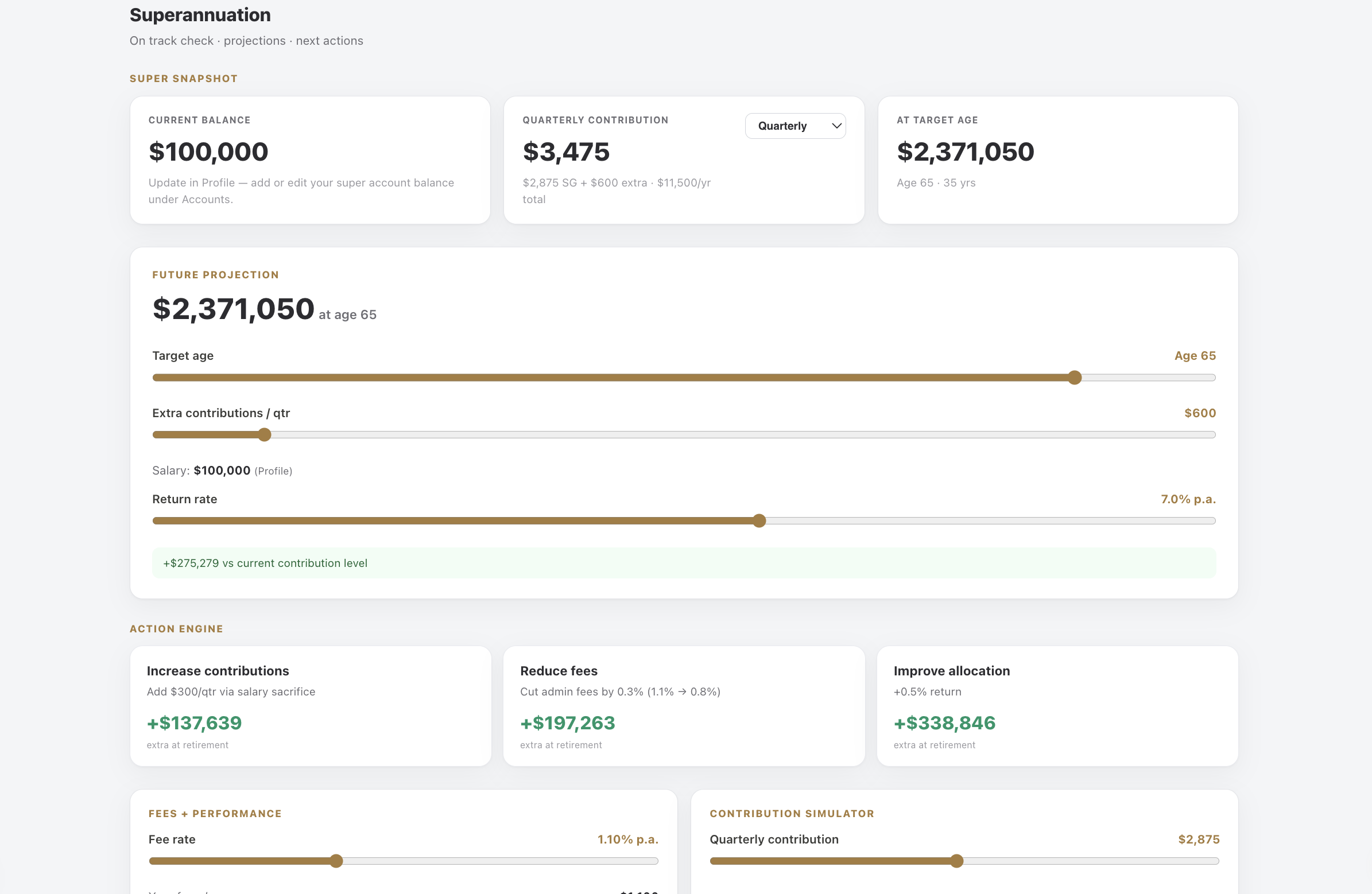
Project balance to retirement, model contributions, and compare fund fees alongside your net worth.
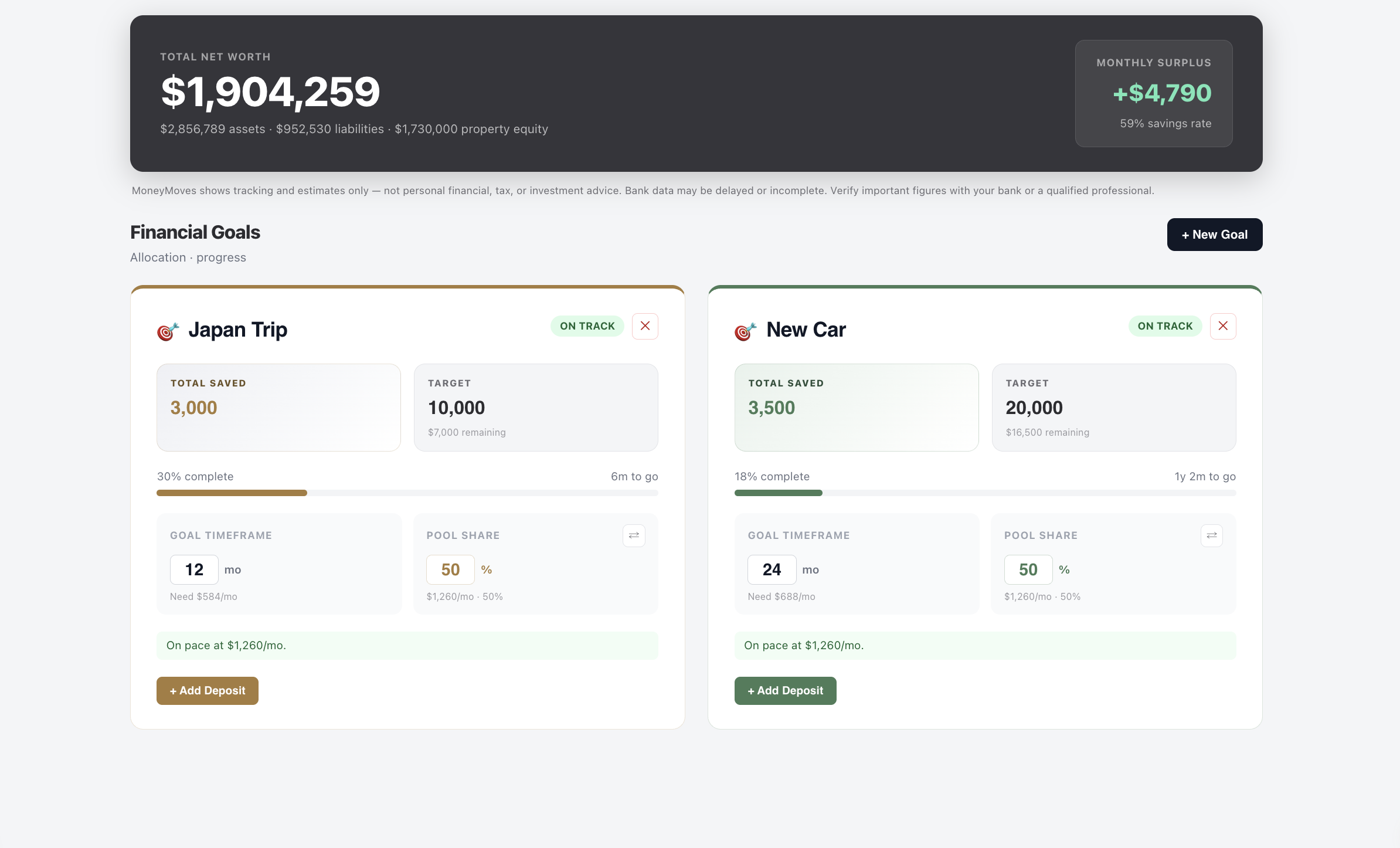
Goals with allocation
Split your savings pool, track risk and see what needs to change to hit every target.
Property portfolio
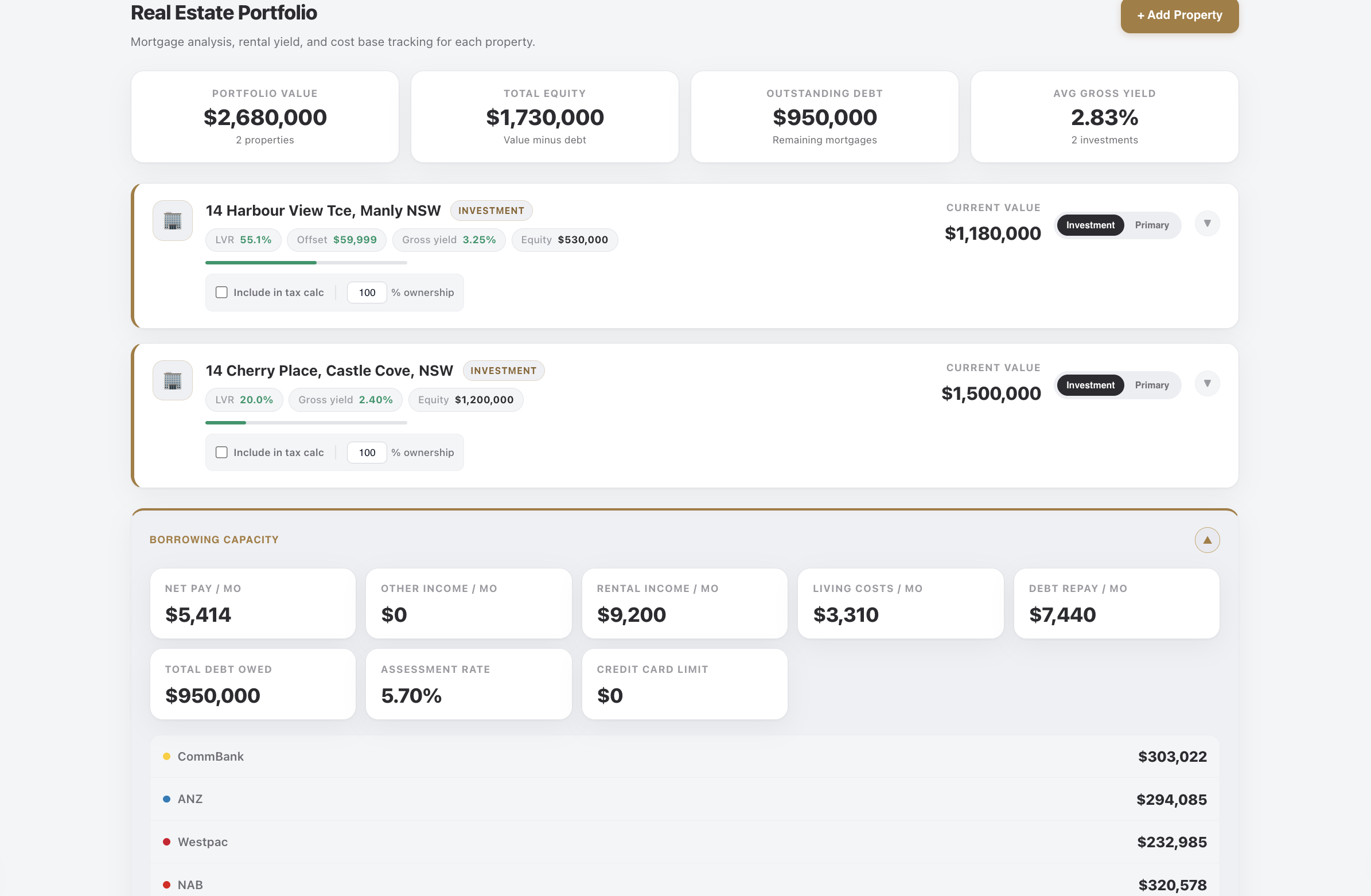
Track value, loans, rent, yield and borrowing capacity alongside your whole net worth.
AI weekly brief
Plain-English coaching that notices what changed and turns it into specific next moves.
Feature heavy, not heavy to use
From weekly cash flow to long-term wealth, every tool speaks to the next one.
M
What's included
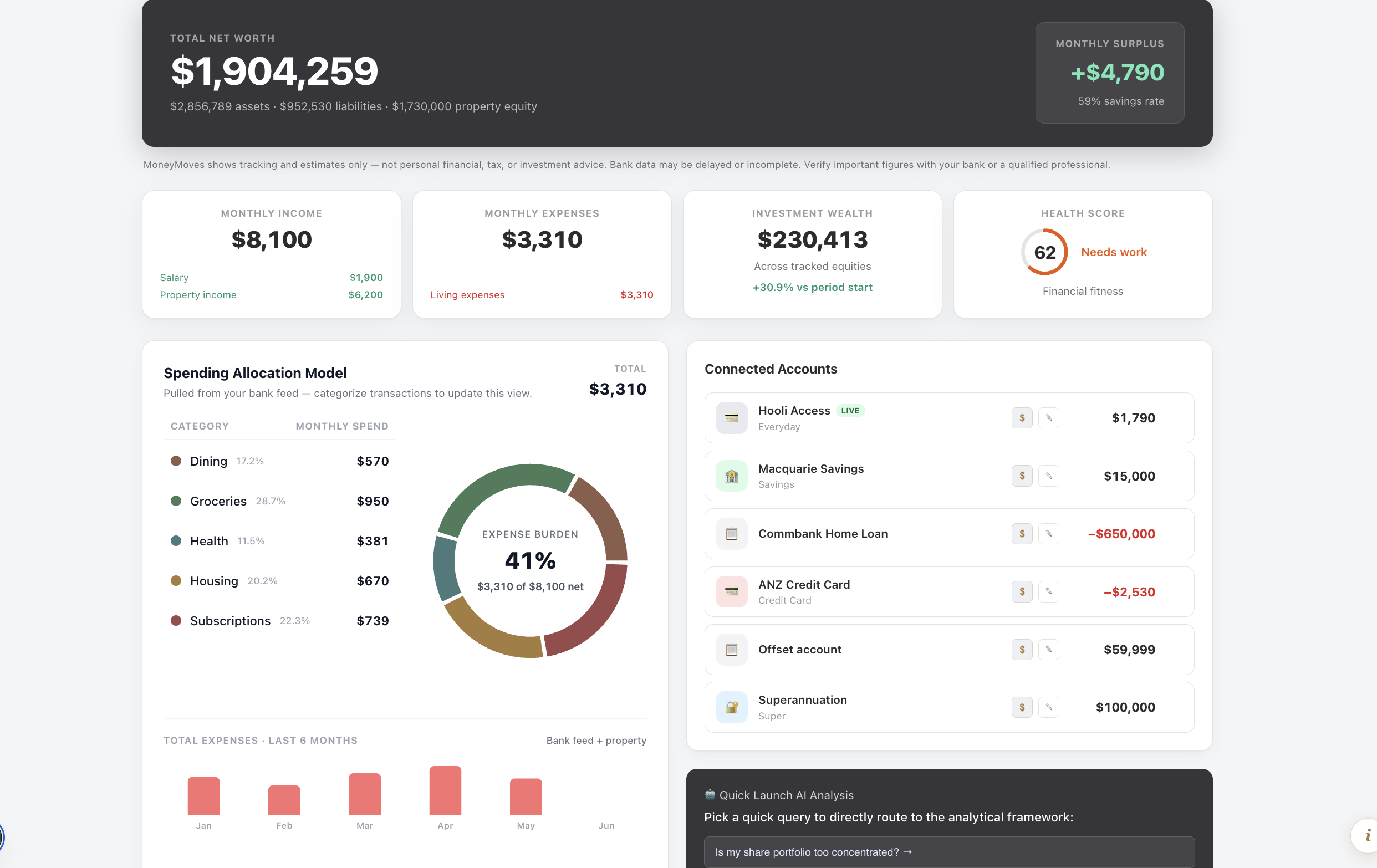
Net worth hero with assets, liabilities, and property equity
Monthly income vs expenses with one-click drill-down
Spending allocation pie driven by bank feed categories
Investment wealth and portfolio trend at a glance
Financial health score across savings, debt, and cash flow
Expense trend chart built from categorised transactions
Net worth hero with assets, liabilities, and property equity
Monthly income vs expenses with one-click drill-down
Spending allocation pie driven by bank feed categories
Investment wealth and portfolio trend at a glance
Financial health score across savings, debt, and cash flow
Expense trend chart built from categorised transactions
Overview
Your entire financial position — one calm command view.
The Overview is your read-only cockpit. Net worth, monthly income and expenses, investment wealth, and a financial health score sit together so you always know where you stand before you drill into any tab. Spending is visualised from your transaction categories, and every metric card is a shortcut to where that number is kept — updated when you adjust accounts or categorise entries. All metrics link across tabs from the data you enter.
What's included
Manual holdings and premium brokerage sync
Live price quotes with AUD / USD display toggle
Portfolio performance charts across multiple timeframes
Sector and allocation breakdowns
Purchase lots, partial sales, and sold-assets history
Realised gains calculated for the Tax tab automatically
Manual holdings and premium brokerage sync
Live price quotes with AUD / USD display toggle
Portfolio performance charts across multiple timeframes
Sector and allocation breakdowns
Purchase lots, partial sales, and sold-assets history
Realised gains calculated for the Tax tab automatically
Investments
Holdings, performance, and CGT — without the spreadsheet.
Track ASX and global equities in one place. Add positions manually or connect a brokerage account, switch between AUD and USD display, and watch live quotes update your portfolio value. Record sales with purchase-lot detail so capital gains flow straight into your tax estimate at EOFY. CGT rolls into Tax without re-keying.
What's included
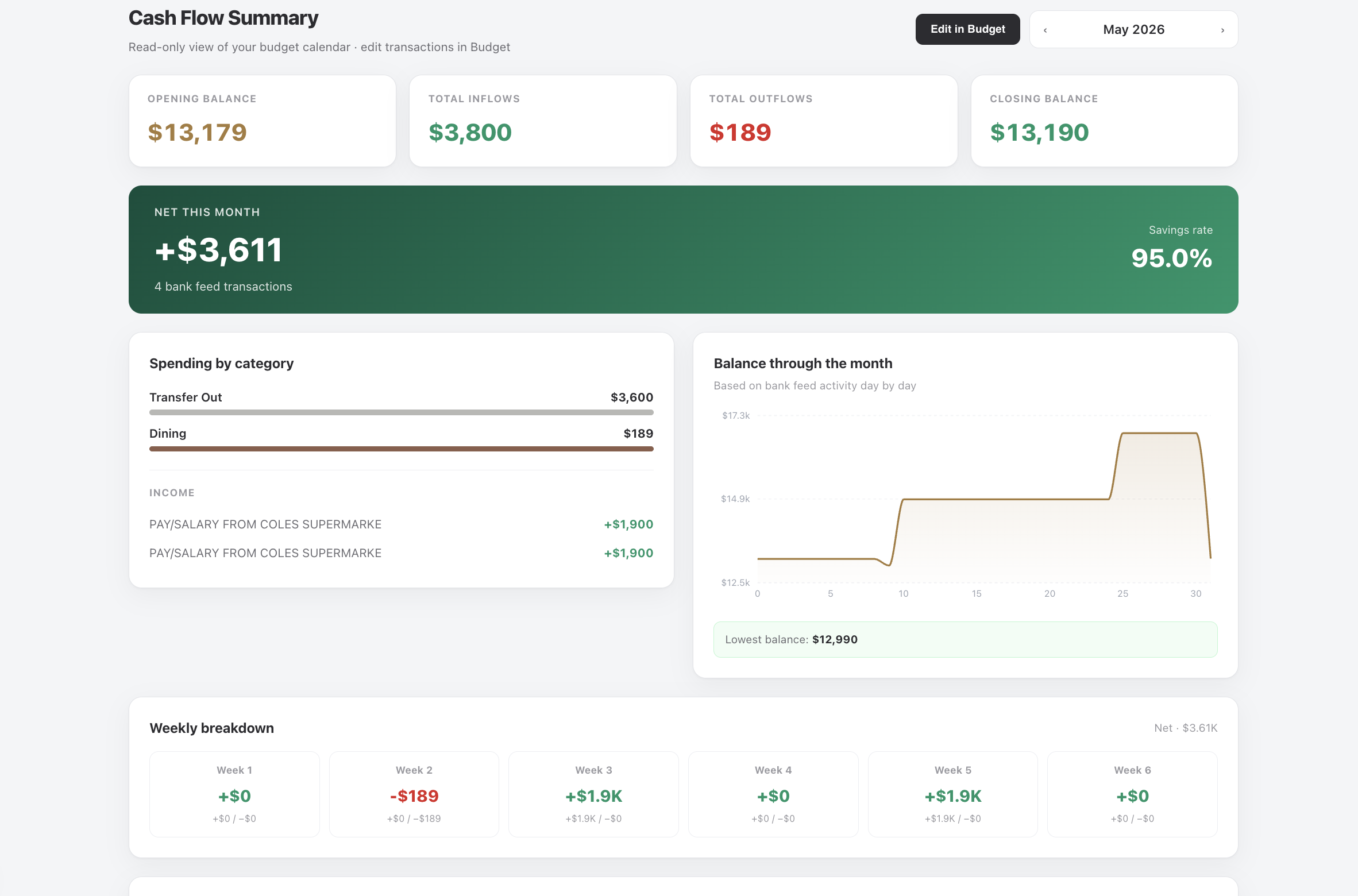
Safe-to-spend today after commitments and goals
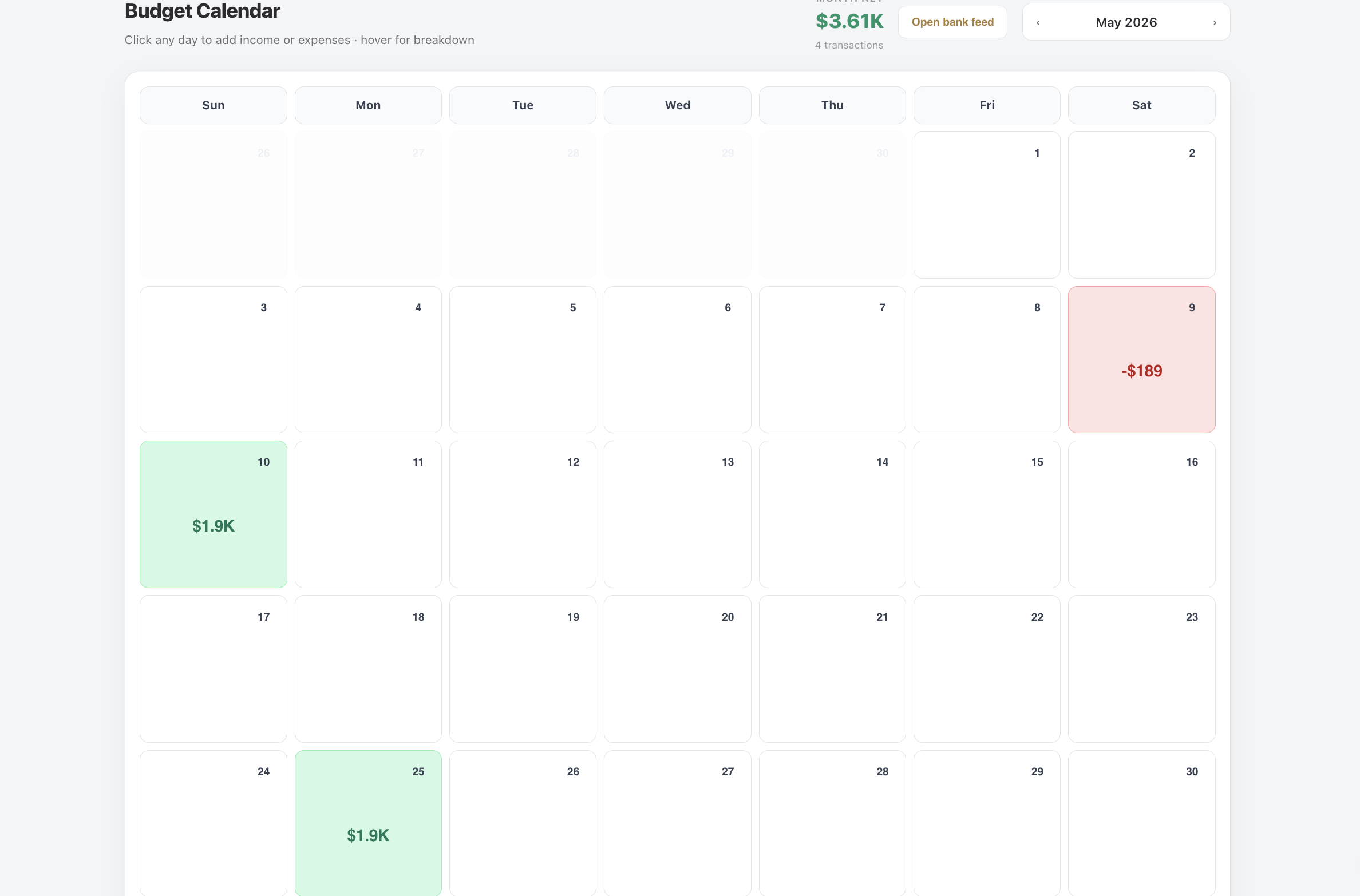
Day-by-day budget calendar for the selected month
Income and spending pulled from categorised bank feed data
Property rent and expenses included when tagged
Manual budget items for one-off future events
Month navigation to plan ahead or review the past
Safe-to-spend today after commitments and goals
Day-by-day budget calendar for the selected month
Income and spending pulled from categorised bank feed data
Property rent and expenses included when tagged
Manual budget items for one-off future events
Month navigation to plan ahead or review the past
Cash Flow
Safe daily spend and a calendar built from real transactions.
Cash Flow answers the question you actually ask: “What can I spend today?” Safe daily spend accounts for rent, bills, goals, and how many days are left in your pay cycle. The budget calendar maps every inflow and outflow onto the month so you can spot tight weeks before they become overdrafts. Starts from real bank transactions.
What's included
Cash runway based on liquid balances and spending pace
Month-by-month income, expenses, and net position
Surplus and deficit highlighting across the timeline
Synced with bank feed categories and account balances
Works alongside the day-by-day budget calendar
Updates as you add transactions or recategorise entries
Cash runway based on liquid balances and spending pace
Month-by-month income, expenses, and net position
Surplus and deficit highlighting across the timeline
Synced with bank feed categories and account balances
Works alongside the day-by-day budget calendar
Updates as you add transactions or recategorise entries
Forecast
See runway and surplus pressure before the month turns.
The forecast view projects how long your cash lasts at current spending and surfaces month-by-month income, bills, and surplus. It is the forward-looking companion to the calendar — ideal when you are planning a big purchase, a lean quarter, or checking whether this month’s surplus can cover next month’s commitments. Matches Overview and Bank Feed categorisation.
What's included
Portfolio view: total value, equity, debt, and average yield
Per-property mortgage, rent, expenses, and ownership %
Bank feed sync for property-tagged income and costs
Home loan balances from accounts you set up in Profile
Repayment and extra-payment scenario tools
Borrowing capacity estimates with adjustable assumptions
Rental income optional inclusion in Tax calculations
Portfolio view: total value, equity, debt, and average yield
Per-property mortgage, rent, expenses, and ownership %
Bank feed sync for property-tagged income and costs
Home loan balances from accounts you set up in Profile
Repayment and extra-payment scenario tools
Borrowing capacity estimates with adjustable assumptions
Rental income optional inclusion in Tax calculations
Property
Homes and investment properties in one Australian portfolio.
Whether you own your home, a rental, or both, Property tracks value, mortgage, rent, running costs, yield, and equity. Connect a home loan and tag bank transactions as Property to keep rent and expenses in sync automatically — or enter values yourself where needed. Borrowing capacity modelling helps you sense-check the next purchase before you speak to a broker. One record feeds net worth, income, and Tax.
What's included
Home deposit, emergency fund, travel, retirement, and custom goals
Monthly savings pool from your income and transaction data
Per-goal allocation sliders with % or $ views
On-track, at-risk, and completed status indicators
Deposit logging against each target
Projected completion dates that recalc with your data
Home deposit, emergency fund, travel, retirement, and custom goals
Monthly savings pool from your income and transaction data
Per-goal allocation sliders with % or $ views
On-track, at-risk, and completed status indicators
Deposit logging against each target
Projected completion dates that recalc with your data
Goals
Turn monthly surplus into timelines you can believe.
Set targets for a home deposit, emergency fund, travel, retirement, or anything custom. Each goal shares one monthly savings pool — set by you or informed by your income and spending — so you allocate by percentage or dollar amount and see projected completion dates update as your surplus changes. Log deposits to track real progress against the plan. One monthly pool split realistically across goals.
What's included
PAYG and marginal tax from your salary — linked pay deposits or your own inputs
HECS / HELP repayment integrated with gross income
Multiple salary periods for raises and job changes
Work deductions with optional invoice uploads
Other income lines beyond salary
CGT pulled from Investments sold positions
Rental property income from Property tab
PAYG and marginal tax from your salary — linked pay deposits or your own inputs
HECS / HELP repayment integrated with gross income
Multiple salary periods for raises and job changes
Work deductions with optional invoice uploads
Other income lines beyond salary
CGT pulled from Investments sold positions
Rental property income from Property tab
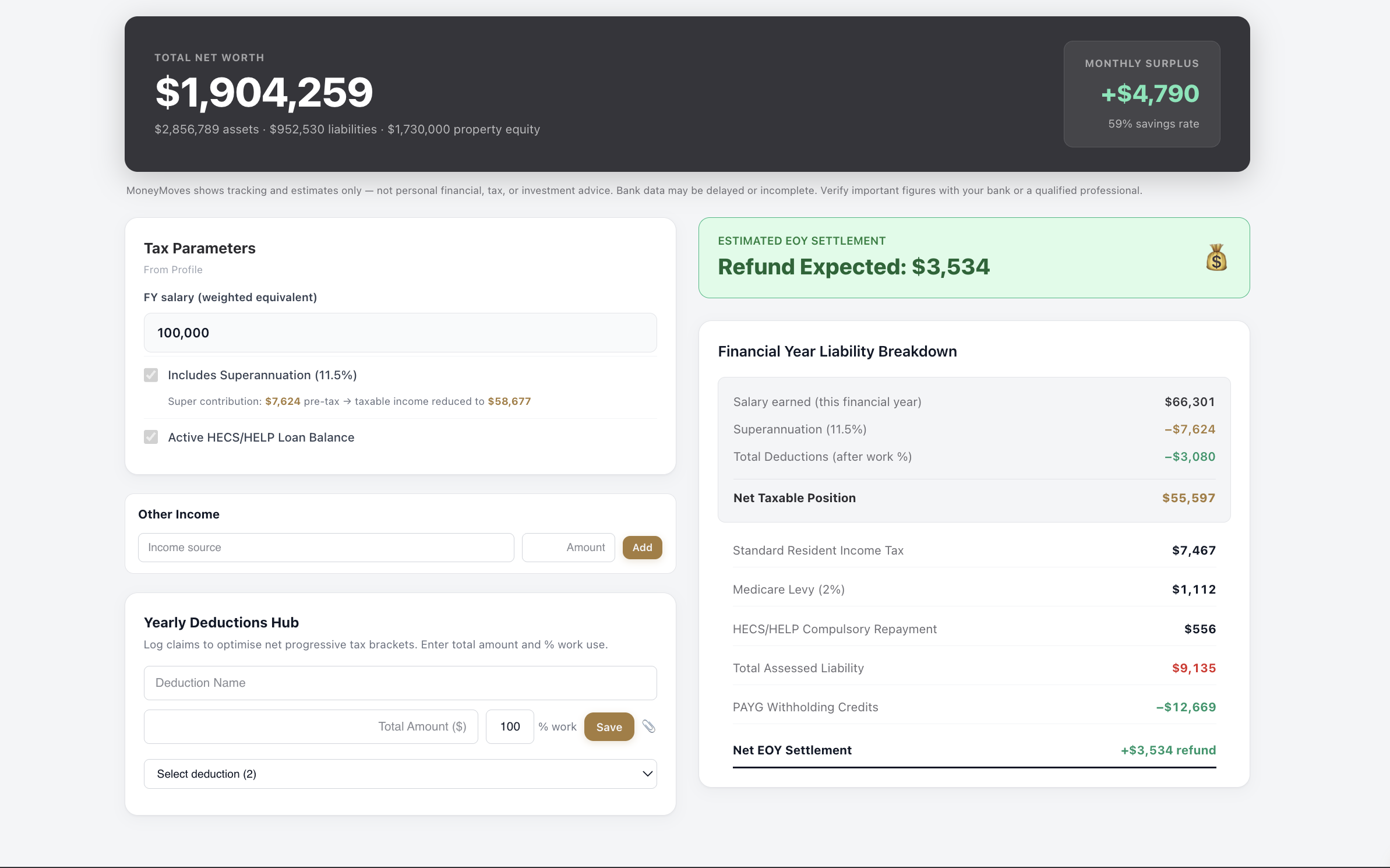
Tax
Australian PAYG, HECS, and take-home — before EOFY surprises.
Estimate annual tax, PAYG withholding, HECS repayment, and net take-home pay using current Australian brackets. Salary periods handle job changes mid-year. Add work deductions with invoice attachments, other income streams, capital gains from sold investments, and rental income from investment properties — all in one estimate, not a lodged return. Uses your pay, HECS, CGT, and rental from the app.
What's included
Balance projection to a chosen retirement age
Employer super from your salary and super rate (linked or entered)
Extra contribution and salary-sacrifice modelling
Return-rate scenarios from conservative to optimistic
Contribution frequency options
Super fund comparison and fee awareness
Auto-saved preferences synced to your account
Balance projection to a chosen retirement age
Employer super from your salary and super rate (linked or entered)
Extra contribution and salary-sacrifice modelling
Return-rate scenarios from conservative to optimistic
Contribution frequency options
Super fund comparison and fee awareness
Auto-saved preferences synced to your account
Super
Retirement projection tied to your real contributions.
Project super balance to your target retirement age with employer contributions from your salary and super rate — pulled from linked accounts and your settings, or entered by you. Model extra contributions, adjust return assumptions, and compare fund fees. See how today’s balance and contribution choices compound — alongside the rest of your wealth on Overview. Part of the same net-worth view as everything else.
What's included
Income and expense sliders for quick scenarios
Net worth and goal timeline projections
Temporary adjustments — nothing saves until you choose
AI chat grounded in your financial context
Starter prompts for spending, saving, and planning
Clear path to apply a scenario to your live data when you are ready
Income and expense sliders for quick scenarios
Net worth and goal timeline projections
Temporary adjustments — nothing saves until you choose
AI chat grounded in your financial context
Starter prompts for spending, saving, and planning
Clear path to apply a scenario to your live data when you are ready
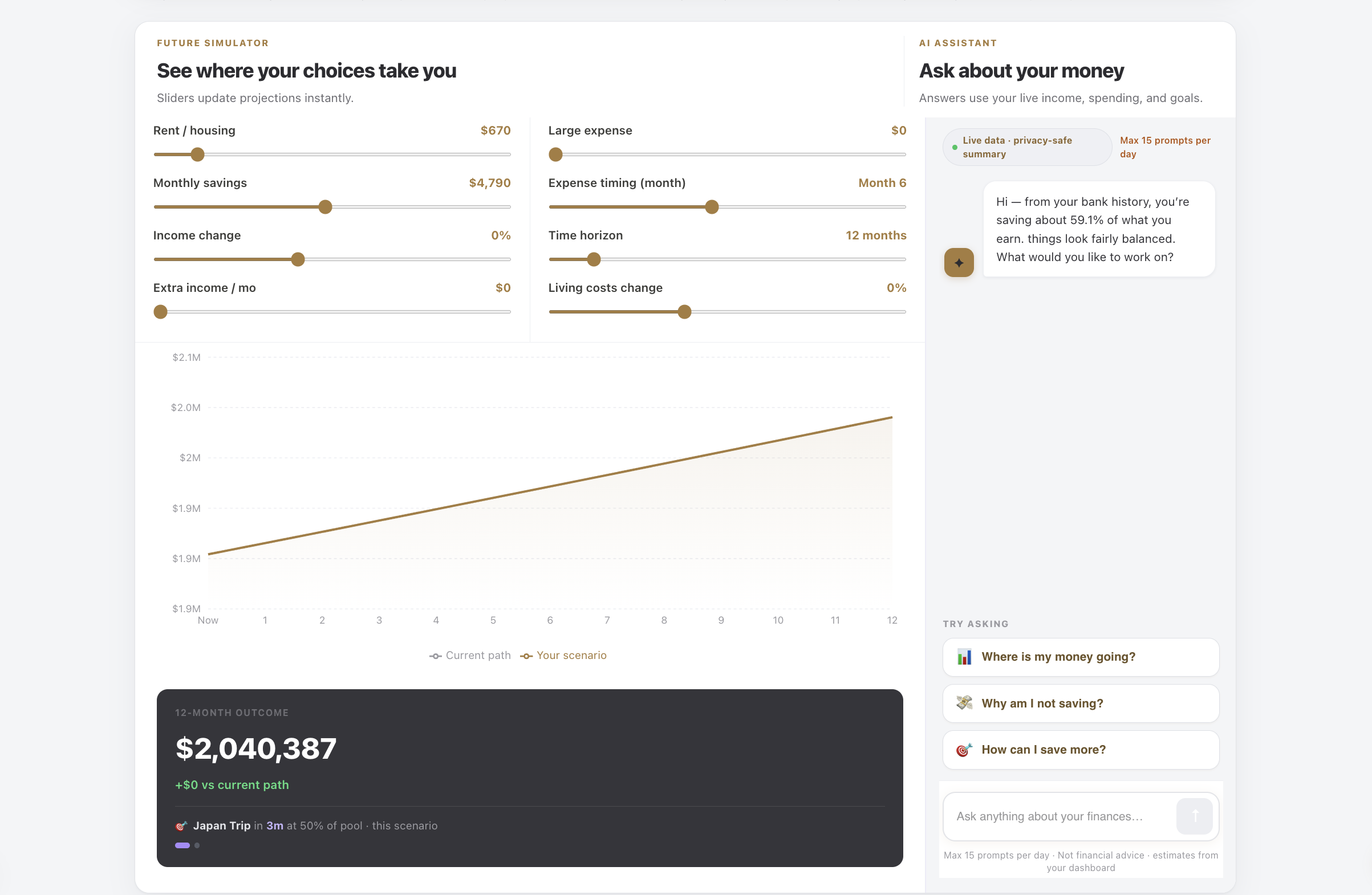
Simulator
What-if scenarios and AI chat — without touching your real data.
Slide income, expenses, rent, and growth assumptions to see instant impact on net worth and goal timelines. Changes stay on this page until you apply them to your live data — otherwise your dashboard keeps updating from the figures you enter in the background. The built-in AI assistant answers in plain English using a privacy-safe summary of your live numbers. Test here, apply to live data when ready.
What's included
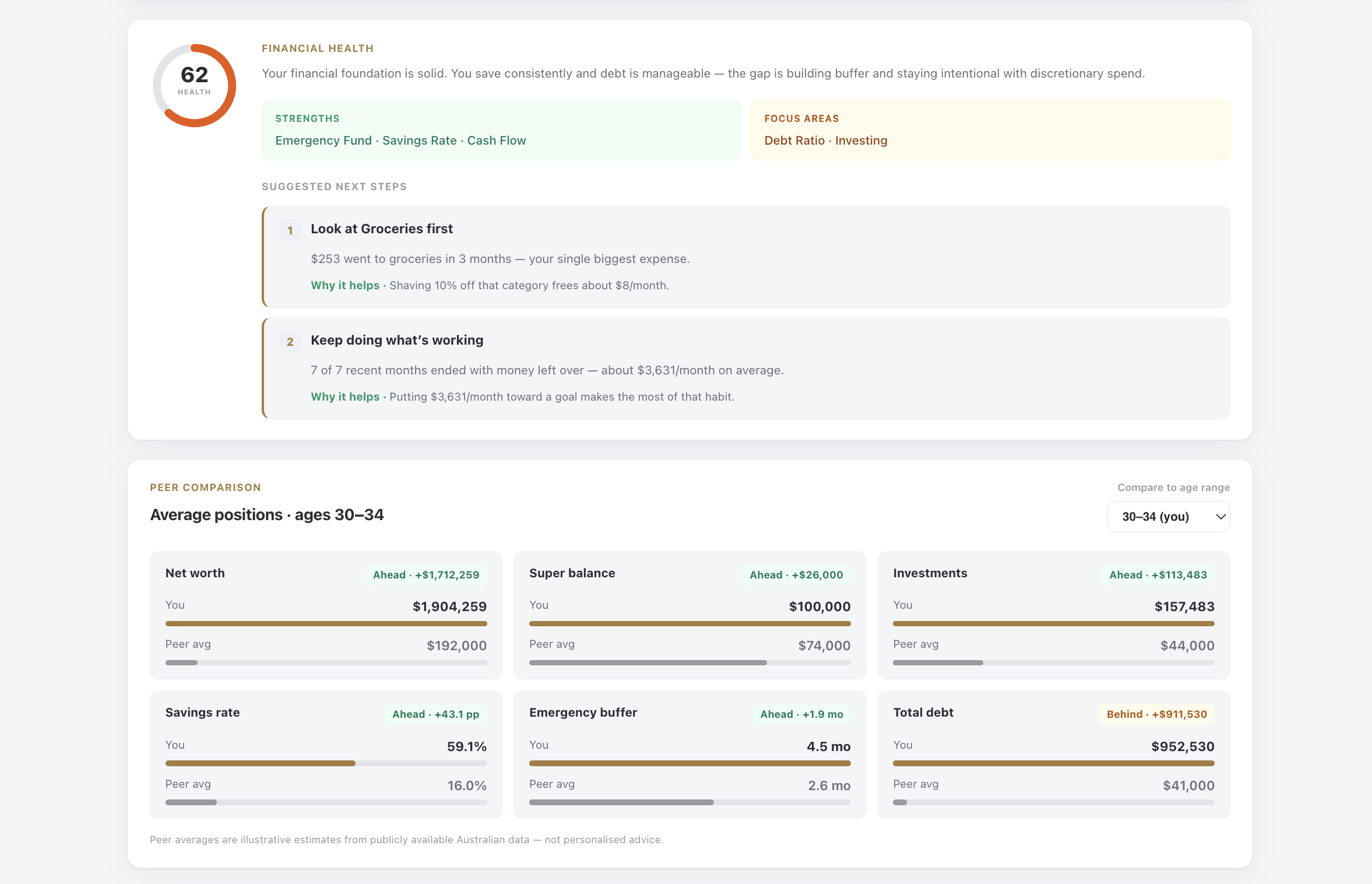
Composite financial health score with breakdown
Strength and risk insights from live dashboard data
Recommended actions linked to relevant tabs
Safe daily spend surfaced in context
Weekly brief with prioritised money moves
Sharper insights as bank feed categorisation improves
Composite financial health score with breakdown
Strength and risk insights from live dashboard data
Recommended actions linked to relevant tabs
Safe daily spend surfaced in context
Weekly brief with prioritised money moves
Sharper insights as bank feed categorisation improves
Coach
Weekly brief, health score, and next steps from your numbers.
Coach turns raw data into direction. A financial health score blends savings rate, debt, goal progress, and cash flow. Insights highlight what is working and what needs attention, with concrete steps tied to the tabs where you can act. Safe daily spend and weekly brief items keep the big picture actionable day to day. Built on your balances, not generic chat tips.
START FREE, UPGRADE WHEN READY
Ready to move smarter with your money?
Manual tracking is free. Advanced planning, property tools and AI coaching unlock with Premium.
Free
$0
Everything you need to see where you stand and set goals.